Banglarbhumi 2026: Khatian, Plot Info, Login, App & Free e-Porcha
Banglarbhumi is the West Bengal government’s land records portal at banglarbhumi.gov.in, run by the Land & Land Reforms and Refugee Relief & Rehabilitation Department. You can search khatian and plot details by district, block and mouza, apply for mutation, pay khajna, and, since July 2026, download digitally signed khatian and plot information free of charge.
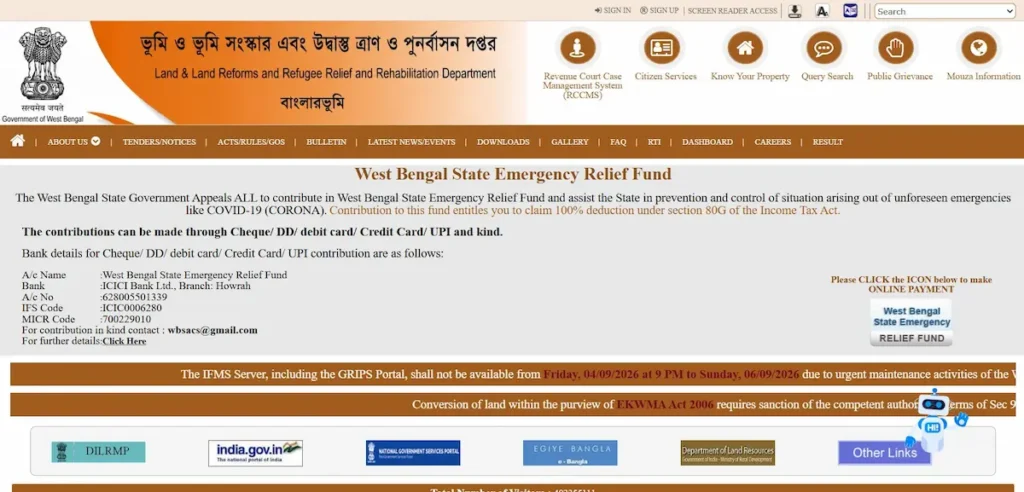
This is an independent guide. We are not the government portal and never ask for your password, documents, or payment.
What is Banglarbhumi, and which website is official?
Banglarbhumi (বাংলার ভূমি, “Bengal’s land”) is the West Bengal government’s online land records system, run by the Land & Land Reforms and Refugee Relief & Rehabilitation Department. Most blocks keep their records on the department’s e-Bhuchitra software, and the portal shows that live data block by block.
The only official address is banglarbhumi.gov.in. Sites ending in .net, .com, .info or .website are privately run, including this guide. So if you searched “banglarbhumi net” or “banglar bhumi government in”, the portal you want ends in .gov.in.
The address stays the same every year. “Banglarbhumi 2025” and “2026” lead to one portal; only the rules and fees change, as the next section shows.
The department’s mobile app, Jomir Tothya, is no longer on Google Play (see the App section below), so the website is the official way to use Banglarbhumi on a phone.
How to spot a fake Banglarbhumi site
Look at the address bar: the real portal ends in .gov.in. A khatian or plot search there is free, so a site charging for one is not the government. And type your Banglarbhumi password only on banglarbhumi.gov.in, never on another website or app.
What changed on Banglarbhumi in 2026
Since July 2026, a digitally signed copy of your khatian (Record of Rights) or plot information costs nothing when you apply online. The state removed both the application fee and the authentication fee.
The change came through a notification dated 2 July 2026. It amended Rules 320H and 320I of the Bengal Records Manual, 1943, using the rule-making powers in Section 57 of the West Bengal Land Reforms Act, 1955 (The Statesman).
| Free since July 2026 | Still charged |
|---|---|
| Digitally signed khatian (RoR), applied for online | Certified hard copies |
| Digitally signed plot information, applied for online | Other physical documents |
In practice, the government fee for an online e-porcha is now zero. If an agent or cyber café helps you apply, anything they charge is for their own service, not the document.
Banglarbhumi services at a glance
Each portal service and the job it does:
| Service | What you use it for |
|---|---|
| Know Your Property | View khatian and plot details by district, block and mouza |
| Query Search | Find a record using a query number and year |
| RS-LR Information | Match an old RS plot number to its current LR number |
| RoR request | Get a digitally signed khatian (e-porcha) |
| Plot and mouza map request | Order a map of one plot or a whole mouza |
| Mutation application and status | Record a new owner after a sale, gift or inheritance, then track the case |
| Warish application | Apply as the legal heir of a deceased owner |
| Conversion application | Change agricultural land to another use |
| Khajna and fee payment | Pay land revenue and service fees online |
| Application GRN Search | Find an application or payment by its GRN |
| Application/receipt reprint | Print a lost acknowledgement or receipt |
| Public Grievance | Report a record error or service problem and track it |
Account needed: Know Your Property, RS-LR Information, RoR requests, and the mutation, warish and conversion applications all ask you to sign in.
Sign-up: free, with one form and a mobile OTP (see Banglarbhumi login and sign-up below).
Banglarbhumi login and sign-up
Do you need to log in?
Yes, for most tasks. Know Your Property and RS-LR Information, the main land searches, ask you to sign in, and every online application needs an account too. Registration is free and needs a mobile number linked to your Aadhaar or bank account.
How to sign up
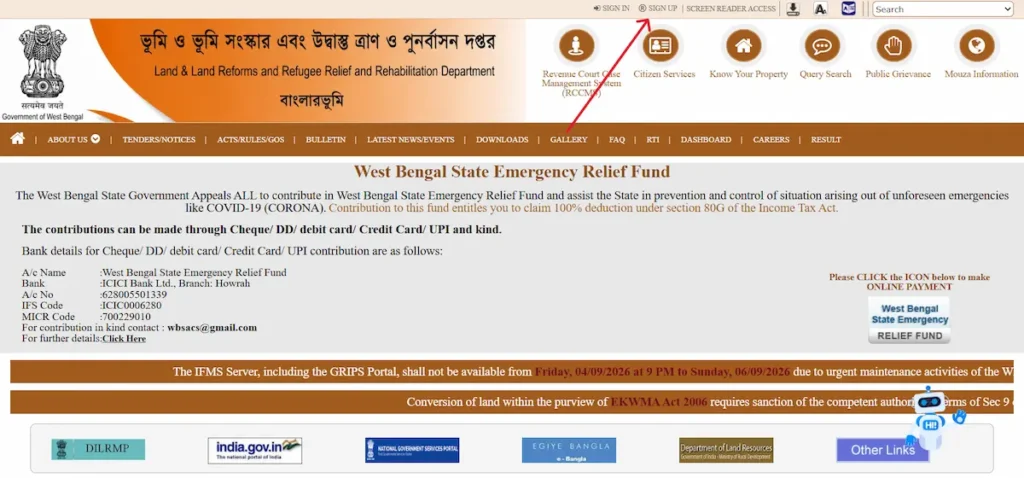
- Open banglarbhumi.gov.in and click Sign Up at the top of the page.
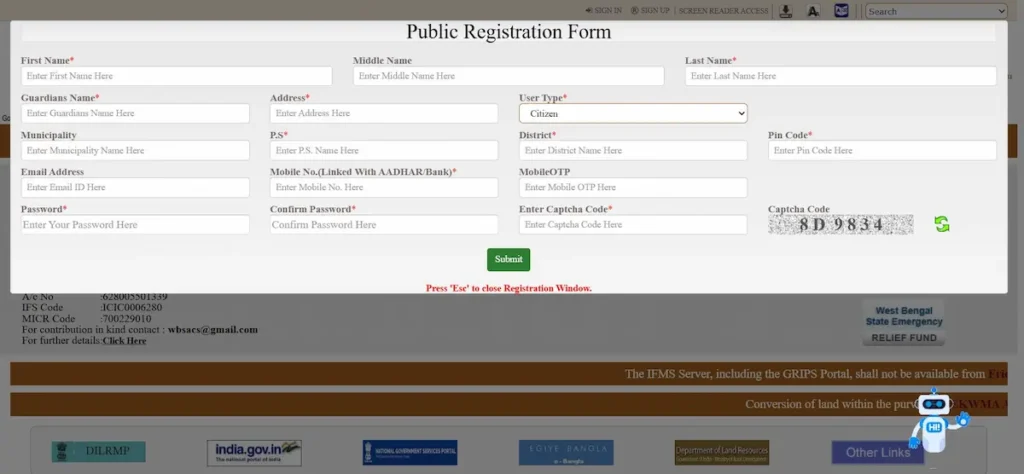
- Fill in the Public Registration Form: first and last name (middle name optional), guardian’s name, address, police station (P.S.), district and PIN code. User Type is already set to Citizen; Municipality and email are optional.
- Enter a mobile number linked to your Aadhaar or bank account, then type the OTP it receives in the Mobile OTP box.
- Set your password, confirm it, enter the captcha code and click Submit.
Your user ID is the mobile number you registered. Use a number you plan to keep, because password resets depend on it.
How to sign in
- Click Sign In at the top of the homepage.
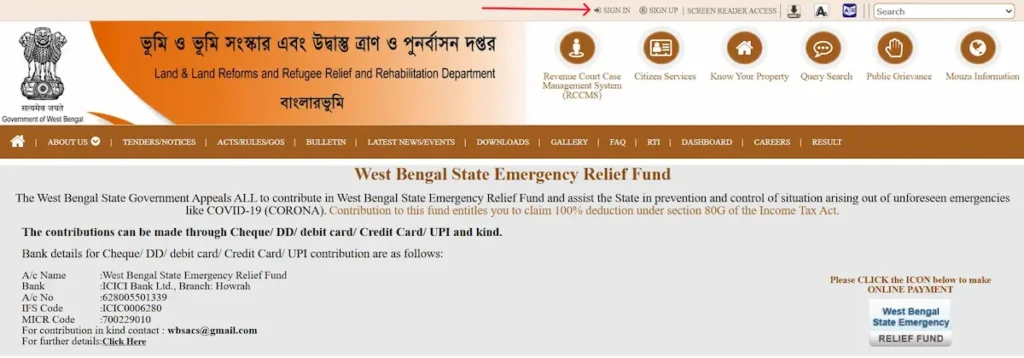
- Select Citizen. The Departmental Users option is for land department staff.
- Enter your registered mobile number, your password and the captcha, then click Next.
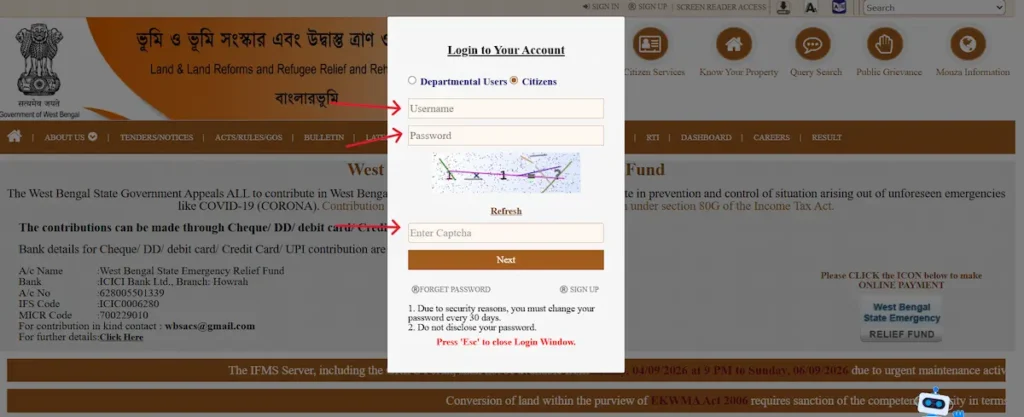
- If the portal sends an OTP to your registered mobile number, enter it to finish signing in.
Forgot password, lost number or login not working
To reset a password, open the Sign In window and click Forget Password (the portal’s own spelling). Enter your registered mobile number, request the OTP, enter it, then type your new password twice.
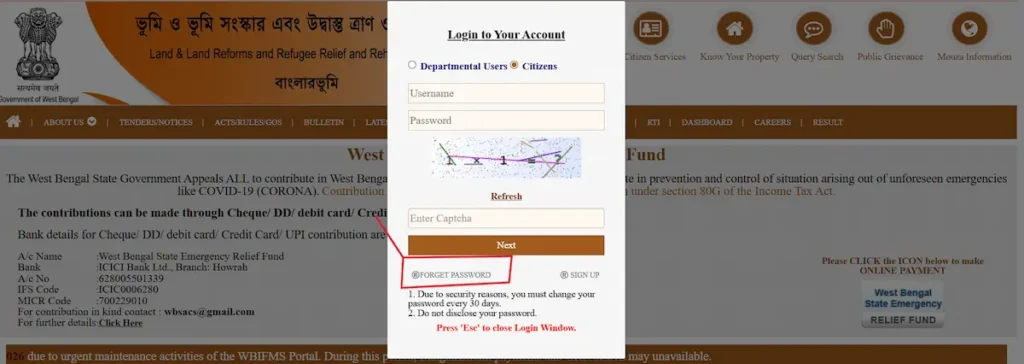
The reset OTP goes only to your registered number. If you no longer have that number, contact your Block Land & Land Reforms Office (BL&LRO). Keep your application numbers and GRNs safe meanwhile.
If correct details still fail, refresh the captcha and retype it exactly. Then clear your browser cache or try Chrome or Firefox.
How to check khatian and plot information (Know Your Property)
Know Your Property is the portal’s free land search. It shows the recorded owner of a khatian or plot, its area and its land class. You must sign in with a citizen account before searching.
What you need before you search
You need four details: district, block, mouza, and either the khatian (খতিয়ান) number or the plot or dag (দাগ) number. The schedule of property in a registered deed lists the mouza and dag number. An old porcha (পরচা) or a khajna receipt usually carries the khatian number.
Search by khatian or plot number
- Open banglarbhumi.gov.in and click Know Your Property in the top menu.
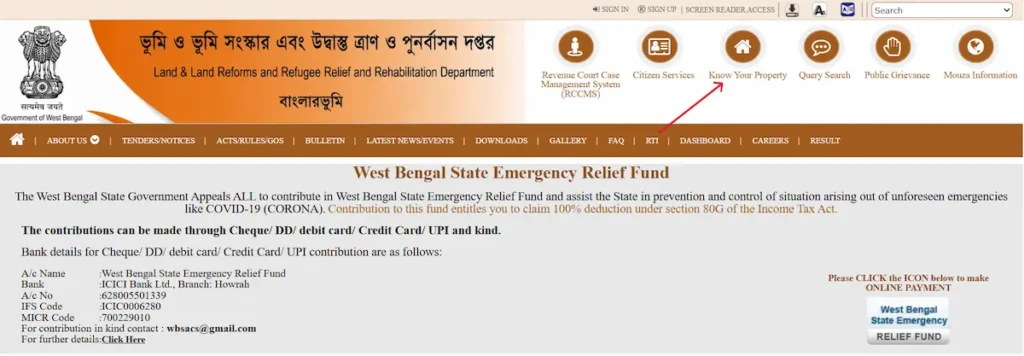
- When the portal asks you to sign in, log in with your citizen account (steps above).
- Under Mouza Identification, select your district, then block, then mouza.
- Choose Search By Khatian or Search By Plot.
- Enter the number, type the captcha and click View.
The record loads on screen, with the mouza’s JL number and police station shown above it.
No khatian or plot number?
An old deed probably quotes an RS dag number, so convert it through RS-LR Information first (see the RS and LR section). If you hold a query number and year, use Query Search instead. Otherwise, take the deed to your Block Land & Land Reforms Office (BL&LRO), where staff can look up the record.
Can you search land records by owner name?
No. Know Your Property searches only by khatian or plot number, and the portal has no owner-name search. Some websites claim otherwise, but the form offers just those two options. A name alone will not find land online, so use the routes above.
How to read your khatian and plot results
A result has two parts: khatian details describe the whole holding, and plot details describe each parcel in it.
| Field | What it tells you |
|---|---|
| Khatian number | The account number of one holding in that mouza |
| Owner name and owner type | The recorded raiyat (রায়ত), with father’s or husband’s name and address to tell namesakes apart |
| Total plots and total area | How many dags the khatian holds and their combined area |
| Plot number | The current LR dag of each parcel |
| Classification (শ্রেণি) | Recorded land class, such as shali (paddy land), bastu (homestead), danga (high, dry land) or pukur (pond) |
| Share and share area (acre) | Each co-sharer’s portion when several people hold one plot |
| Tenant type and possessor | Whether anyone besides the owner holds rights in the plot |
Read the last row before any purchase. The department records bargadars (বর্গাদার, sharecroppers) in the record of rights, and a sale does not end a recorded bargadar’s right to cultivate. If one appears, take legal advice before paying.
Land units in West Bengal
Records show area in acres; buyers usually talk in katha and bigha.
| Unit | Equals |
|---|---|
| 1 acre | 100 decimal (satak) |
| 1 decimal | 435.6 sq ft |
| 1 katha | 720 sq ft |
| 1 bigha | 20 katha, or 14,400 sq ft |
So 1 decimal is about 0.6 katha, and 1 acre is just over 3 bigha.
Is the on-screen record legally valid?
No. The screen view is for checking only. For a bank, court or registry, use the digitally signed RoR or plot information, free online since July 2026, or a certified hard copy where paper is demanded.
RS and LR plot numbers (sabek dag and hal dag) explained
West Bengal has two main generations of land records. The RS (Revisional Settlement) record-of-rights was prepared in the mid-1950s under the West Bengal Estates Acquisition Act, 1953. Ceiling laws and later reforms left it outdated, so a fresh statewide revision followed under the West Bengal Land Reforms Act, 1955. That LR record is what the portal shows today.
Each survey numbered plots separately. Sabek dag (সাবেক দাগ) is the old RS plot number; hal dag (হাল দাগ) is the current LR number. Old deeds often quote the RS dag, and one RS plot may now be several LR plots.
How to convert with RS-LR Information
- On banglarbhumi.gov.in, open Citizen Services and select RS-LR Information.
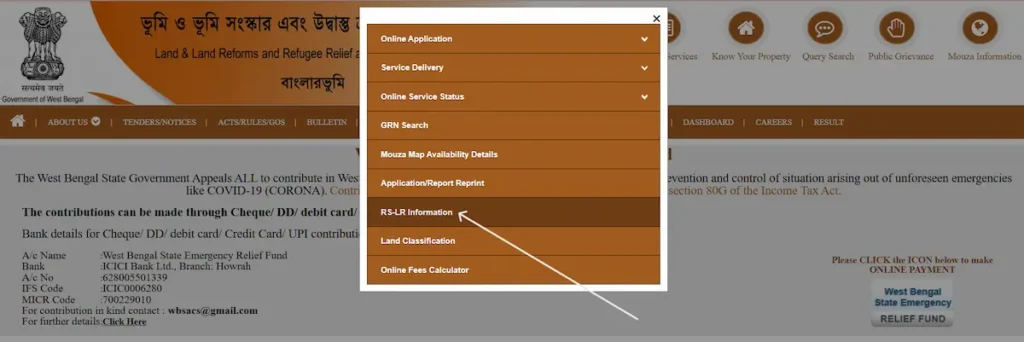
- When the portal asks you to sign in, log in with your citizen account.
- Select district, block and mouza.
- Choose the direction: RS to LR (sabek to hal) or LR to RS (hal to sabek).
- Enter the plot number and captcha, then click View.
Then search the LR number in Know Your Property to see the current owner.
Banglarbhumi online application: which one do you need?
Most applications sit under Online Application on the portal and need a citizen account. Find your situation below.
| Your situation | Apply for | Keep ready |
|---|---|---|
| Bought land through a registered deed | Mutation (নামজারি, dakhil kharij) | Registered deed, ID and address proof |
| Inherited land from a recorded owner | Warish (ওয়ারিশ) application, then mutation | Death certificate; legal heir certificate from a court, panchayat pradhan or councillor |
| Your name is wrong in the record | Public Grievance, or a visit to the BL&LRO | Deed, ID proof, old porcha |
| Farmland to be used for a house or business | Conversion application | Ownership record; affidavit for conversion from the portal’s Downloads |
| Need an official copy of the record | RoR request | District, block, mouza, khatian or plot number |
| Need a map | Plot map or mouza map request | Mouza and plot details |
| Land revenue due | Khajna payment | Khatian details |
Mutation and conversion carry a processing fee, paid online through GRIPS, the state’s payment gateway. The portal’s Calculate Fee option shows the amount before you pay. A digitally signed RoR applied for online is free.
Registration is not mutation
Registering a deed at the Sub-Registrar’s office records the sale. Mutation at the BL&LRO changes the owner’s name in the khatian. Until then, the record still shows the seller, which causes trouble when you take a loan, sell or pass the land on.
How to track your application
- Mutation Status: search by case number, or by deed number and year.
- Mutation Plot Khatian Status: check mutation cases by plot or khatian.
- 30 Days Notice Mutation Case: see cases in their 30-day notice period.
- Application GRN Search: find an application or payment by its GRN.
- Public Grievance status: track a complaint by its UPN.
Save these numbers
Note every application number, GRN and grievance UPN. Never post them in comment sections or public groups.
Banglarbhumi app: is Jomir Tothya still available?
No. JOMIR TOTHYA (জমির তথ্য), the land department’s official app, was unpublished from Google Play on 22 June 2025, according to the app tracker AppBrain. Many websites still tell you to download it there; that advice is out of date.
Before its removal, the app showed khatian and plot details, RS-LR conversion, fees, officer contacts and mutation case status. It had more than 1,000,000 downloads.
What to use instead
Open banglarbhumi.gov.in in your phone’s browser and sign in. Know Your Property, RS-LR Information, applications and payments all work there.
If Jomir Tothya is already on your phone, it may still open, but a removed app gets no updates. Check anything important on the website.
Avoid unofficial apps and APK files
Several land records apps on Google Play are made by private developers; one, WB Land, Plot & Khatian Info, calls itself unofficial in its own description. Old Jomir Tothya APK files on download sites are not checked by Google Play. Never enter your Banglarbhumi password in any app.
Common Banglarbhumi errors and how to fix them
| Error | Likely cause | What to do |
|---|---|---|
| Record not found | Wrong block or mouza, or an RS number entered where an LR number is expected | Recheck the location; convert old numbers through RS-LR Information |
| Captcha error | Mistyped or expired captcha | Refresh the captcha and retype it |
| “GRIPS Data Not Found” after paying | Payment not yet linked to the application | Follow the payment rule below |
| “Associated Head or requisite Amount not matching” | Amount paid differs from the fee due | Follow the payment rule below |
| No case number after a mutation payment | Application not updated after payment | Follow the payment rule below |
| 500 Internal Server Error, or page not loading | Portal server problem | Retry later, outside office hours |
| Can’t sign in after registering | Wrong login type or user ID | Choose Citizen, enter your mobile number as user ID, reset the password if needed |
Payment rule: never pay a second time. Keep the GRN, check the application through Application GRN Search, and if nothing changes, raise a Public Grievance or visit your BL&LRO with the GRN and payment receipt.
Checking land before you buy: what Banglarbhumi shows and what it doesn’t
Banglarbhumi shows whom the government records as owner. It does not prove the land is free of loans or disputes. Run these checks before paying any advance:
- The seller is the recorded owner in the current LR khatian, holding at least the share being sold.
- The plot’s tenant and possessor details show no recorded bargadar or other occupier, or a lawyer has explained their rights to you.
- The land class suits your plan. A house on shali land needs conversion first.
- Mutation Plot Khatian Status shows no pending case on the plot.
- The dag number in the seller’s deed traces to the current LR plot through RS-LR Information.
- The plot map matches the land on the ground. A licensed surveyor (amin) can measure the boundaries.
- The seller’s latest khajna receipt shows no revenue due.
What the portal cannot tell you
Mortgages and other registered charges sit in registration records, not in the khatian. Search the deed history at wbregistration.gov.in, run by the Directorate of Registration and Stamp Revenue. Then get an encumbrance certificate from the Sub-Registrar office, and have a lawyer check the title across both records.
Official contacts and when to visit the land office
Portal support comes from the Directorate of Land Records and Surveys, West Bengal:
- Address: 35 Survey Building, Gopal Nagar Road, Kolkata 700027
- Phone: 033-2479-5726
- Toll-free: 1800-345-6600
- Email: dlrswb@gmail.com
Visit your Block Land & Land Reforms Office (BL&LRO) for mutation hearings, record corrections a grievance can’t fix, and boundary disputes. Above it sit the sub-divisional and district land offices.
Buying a flat or house in Kolkata? Inside Kolkata Municipal Corporation limits, KMC’s Assessment department separately records the new owner for property tax.
Frequently asked questions
What is the official Banglarbhumi website?
banglarbhumi.gov.in is the only government address for West Bengal land records. Sites ending in .net, .com or .info, and look-alike spellings such as “banglaarbhumi”, are privately run and cannot issue official records.
Is Banglarbhumi different in 2025 and 2026?
No. It is the same portal at the same address. The main 2026 change: digitally signed khatian and plot information applied for online has been free since a notification dated 2 July 2026.
Do I need to log in to check my khatian?
Yes. Know Your Property asks you to sign in with a free citizen account before you search. After that, you need only district, block, mouza and a khatian or plot number.
Can I find land by the owner’s name?
No. The portal has no owner-name search. Find the number in the deed’s schedule of property, an old porcha or a khajna receipt, or ask the BL&LRO.
Is there an official Banglarbhumi app?
Not on Google Play right now. The department’s app, JOMIR TOTHYA, was unpublished on 22 June 2025. Use banglarbhumi.gov.in in your phone’s browser, and avoid unofficial apps and APK files.
Is a downloaded khatian valid for a bank or court?
A digitally signed RoR is the official electronic copy. A screenshot or printout of the search screen is not. Some offices still ask for a certified hard copy, which carries a fee.